
Download Manager Tweak – Enhance Firefox Download Experience, Free & Secure
Overview of Download Manager Tweak
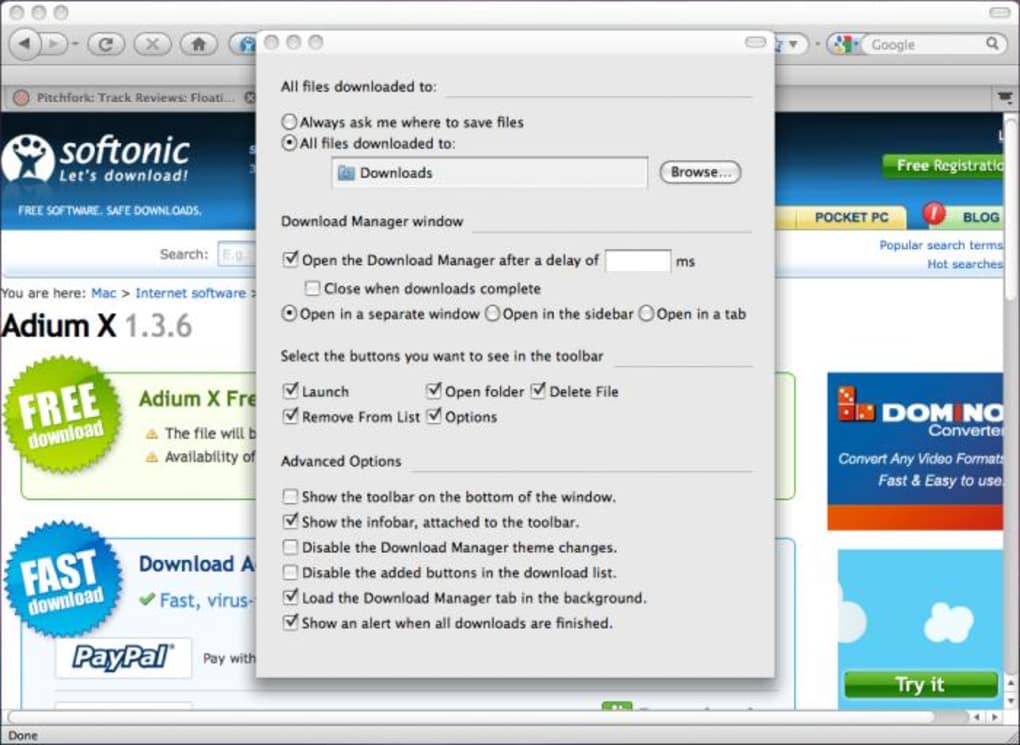
Firefox’s built‑in download manager is already solid, but power users often crave a little extra control. Download Manager Tweak steps in to fill that niche by giving you flexible placement options, a customizable toolbar, and minor UI refinements that make handling large batches of files feel smoother. After installing the add‑on and restarting Firefox, you’ll notice a brand‑new “Downloads” tab under Options.
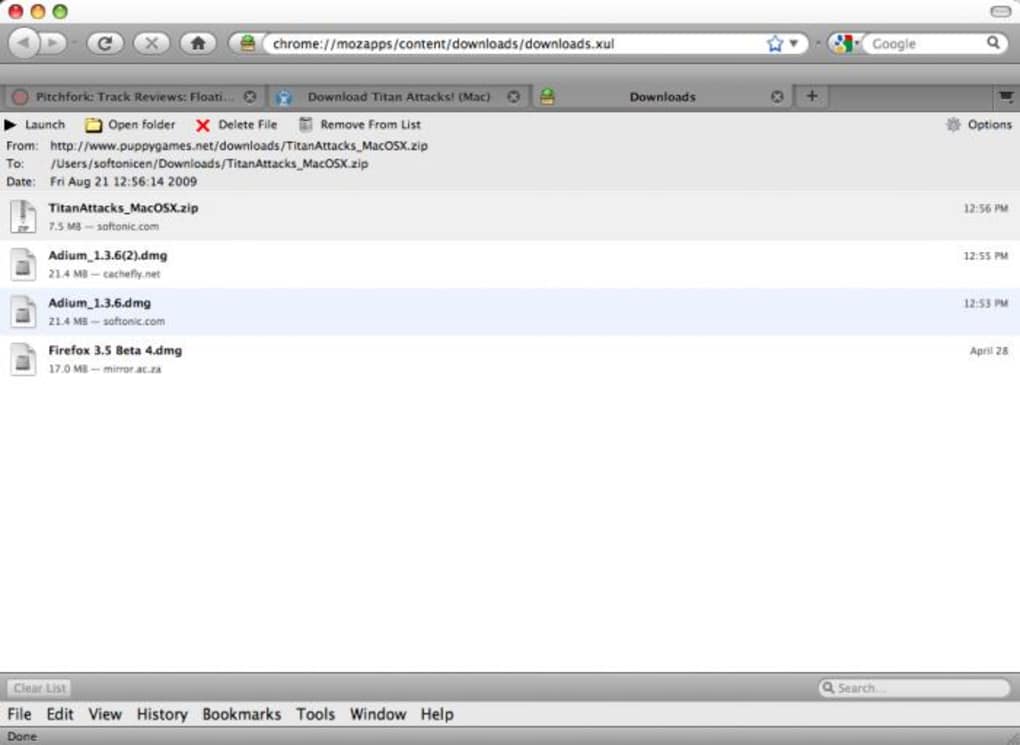
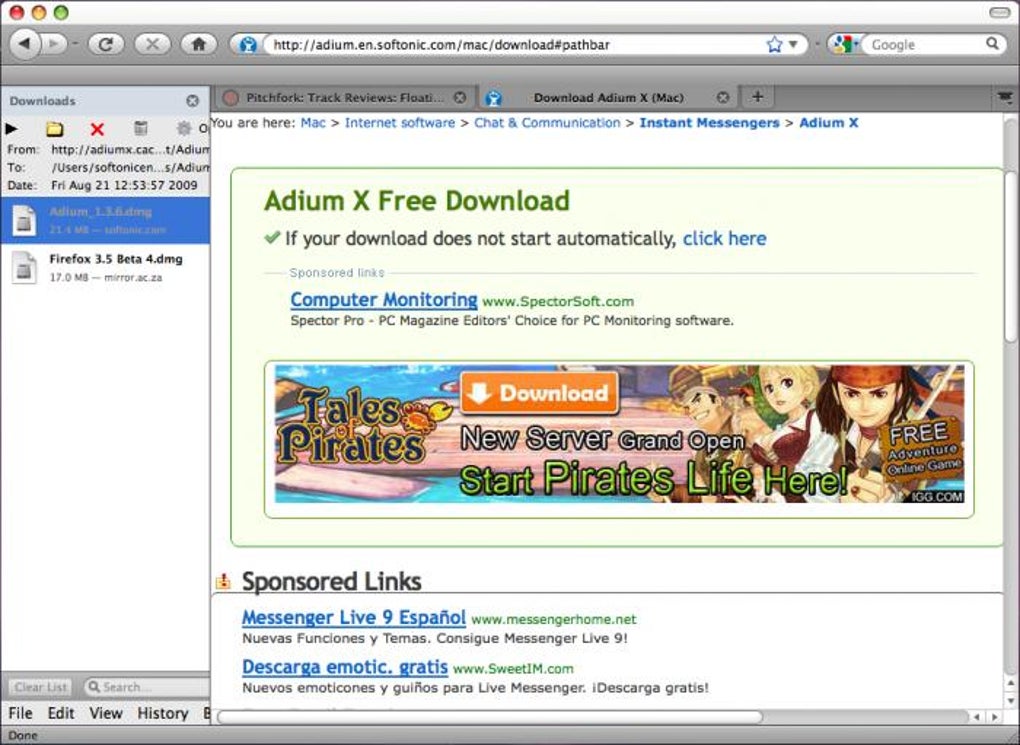
From there, you can decide whether the download list lives in a sidebar, a dedicated tab, or the traditional pop‑up window. The tweak also adds a compact toolbar with one‑click actions such as “Launch,” “Open Folder,” “Delete File,” and “Remove File.” While the changes aren’t groundbreaking, they are thoughtfully designed to keep you within the browser, mimicking the modern feel of browsers like Opera that keep downloads inside the main UI. For anyone who frequently downloads installers, media, or large datasets, the ability to keep the manager visible without juggling extra windows can save valuable screen real estate and reduce context switching.
Moreover, the add‑on respects Firefox’s native download count, improving auto‑open/close behavior and ensuring a seamless experience across Windows Vista‑Aero themes and newer Firefox releases.
Key Features and System Compatibility
Feature List
- Choose download manager placement: sidebar, new tab, or pop‑up window.
- Customizable download toolbar with Launch, Open Folder, Delete, and Remove actions.
- Expanded download information panel for quicker file insight.
- Icon‑only toolbar view for a cleaner look, especially on Vista‑Aero themes.
- Improved handling of auto‑open/close based on Firefox’s built‑in active download count.
- Full compatibility with Firefox 3.7a1 and later, including updated translations for Russian (ru‑RU) and Estonian (et‑EE).
- Bug fixes for button icon updates and CSS references to ensure smooth operation across themes.
Operating System Support
Download Manager Tweak is a Firefox add‑on, which means it runs on any operating system that supports Firefox, including Windows (XP, 7, 8, 10, 11), macOS, and Linux distributions. Because the tweak works inside the browser, there are no separate binaries to install, and the add‑on automatically adapts to the OS‑specific UI conventions of Firefox.
Installation, Daily Use, and Balanced Pros & Cons
How to Install Download Manager Tweak
Installing the tweak is straightforward and mirrors the typical Firefox add‑on workflow:
- Open Firefox and navigate to the official Mozilla Add‑Ons page for Download Manager Tweak.
- Click the “Add to Firefox” button; a confirmation dialog will appear.
- Accept the permissions request, then click “Add.”
- Firefox will download the XPI package and prompt you to restart the browser.
- After the restart, go to Options → Downloads to find the new configuration panel.
Because the add‑on is free and signed by Mozilla, the installation process is secure and does not require any external installers.
Using the New Download Manager
Once enabled, you can tailor the manager to your workflow:
- Sidebar mode: Open the sidebar (press Ctrl+B or click the sidebar icon) and select “Downloads” from the dropdown. The toolbar appears at the top of the sidebar, giving instant access to launch or delete files.
- Tab mode: Choose “Open in new tab” from the Options panel. Each download opens as a separate tab, perfect for multitasking while keeping the main window uncluttered.
- Toolbar customization: Right‑click the toolbar to hide or show individual buttons. The icon‑only view reduces visual noise, especially on high‑resolution displays.
These options are saved between sessions, so you only need to configure them once.
Pros and Cons
Pros
- Flexible placement eliminates the need for a separate download window.
- One‑click toolbar actions speed up file management.
- Free, open‑source, and regularly updated for Firefox compatibility.
- Lightweight; adds minimal overhead to the browser.
- Supports multiple languages and modern Windows themes.
Cons
- Feature set is modest; power users may still miss deeper integration.
- No built‑in download scheduling or bandwidth throttling.
- Only works within Firefox; no cross‑browser support.
- Occasional UI quirks on very old Firefox versions.
- Lacks a built‑in file preview pane.
FAQ and Final Verdict
Is Download Manager Tweak completely free?
Yes, the add‑on is free to download and use. There are no hidden fees or premium upgrades.
Will the tweak affect Firefox’s performance?
The add‑on is lightweight and designed to run alongside Firefox’s native download manager. Most users report no noticeable slowdown.
Can I use the toolbar on mobile Firefox?
Currently, Download Manager Tweak is only available for desktop versions of Firefox. Mobile browsers have a different UI architecture.
How do I revert to the default download window?
Open the Add‑on Options, locate the “Display mode” setting, and select “Pop‑up window.” Restart Firefox to apply the change.
Is the add‑on compatible with the latest Firefox releases?
Yes. The developer updates the code regularly to stay compatible with new Firefox versions and security standards.
Conclusion – Should You Download Manager Tweak?
For Firefox users who value a tidy workflow and want quick access to common file actions without juggling extra windows, Download Manager Tweak is a practical, free solution. It doesn’t reinvent the download manager, but the placement flexibility and toolbar shortcuts add enough convenience to justify the installation. If you’re comfortable with Firefox’s default behavior, the tweak may feel like a nice‑to‑have rather than essential. However, for anyone who regularly downloads multiple files and prefers a sidebar‑style view—similar to what Opera offers—the add‑on delivers a noticeable productivity boost. Give it a try; the risk is negligible, and the payoff in streamlined downloads can be immediate.
Download Manager Tweak now and customize your Firefox download experience for free!







